Compatible with all versions
of Logos Bible Software
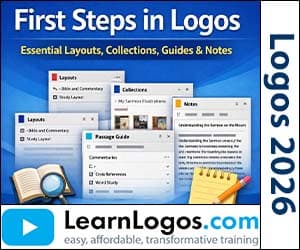
First Steps in Logos Essentials: Layouts, Collections, Guides & Notes
Category: Logos Training
| Retail Price | $15.99 |
| Your Price | $7.99 |
| VIP Price(Join Today & Save!) | $5.00 |
Create New Account
To add products to your cart, create an account. Only your email is needed. Create your account here.
Already have an account? Sign in to add to cart.
Sign in or create an account to save to wishlist.
About This Training
LearnLogos.com offers a step‑by‑step look at the core tools that help you get the most out of Logos Bible Software. In this webinar, Dr. John Fallahee walks you through the basics of setting up and customizing layouts—whether you’re pairing a Bible with a commentary, using a Greek word study layout, or creating your own custom arrangement. He also shows how to add parallel texts side‑by‑side, link panes so you can jump between resources quickly, and save layouts for instant access from the toolbar.
The session continues with practical ways to organize your research. You’ll learn how to build dynamic collections using tag‑based rule strings, create personalized guides by dragging people, places, and events into a single page, and keep your notes tidy with notebooks, anchors, and subject lines. Dr. Fallahee demonstrates how highlights and labels work together, how to search for them, and how to save all of this as a reusable layout or toolbar shortcut.
What You'll Learn
- Introduction to Logos layouts and the Layouts window (Quick Start vs. Saved)
- Bible & Commentary layout: linking panes, using Link Set A, and toggling the Home button
- Adding parallel text: View → Add Parallel Text, configuring resources, and using Set Series for Greek & Hebrew side‑by‑side
- Greek Word Study layout: Bible Word Study, Fact Book, and Lexicon panes with automatic linking
- Building Library Collections: tag‑based rule strings, subject vs. title search, type exclusions, dynamic collections
- Creating a Custom Guide: opening Guides, Make a new guide, drag‑and‑drop elements, naming, activating, and testing with a verse
- Notes workflow: creating a notebook, naming conventions, adding a new note, setting an anchor, customizing the paper‑clip icon
- Highlights: opening the palette, associating a notebook, applying highlights, and using them to capture Scripture passages
- Labels: editing a style, adding attributes, creating a list of labels, applying labels to highlights, and viewing label attributes on hover
- Searching for highlights and labels: using the label. syntax, wildcards, and attribute searches
- Saving a layout: Layouts → Save As, naming, and locating it in the Saved Layouts list
- Customizing the toolbar: dragging a layout icon, showing a label, changing the icon, and organizing icons with folders